Download Samsung USB Driver v1.9.0.0 (Latest Official) for Windows (32/64-bit)
| Views: 111 | Basic | |

Download Spd Drivers 100 Tested Unisoc Latest R4.20.4201
Download the latest official Samsung Android USB Driver v1.9.0.0. This all-in-one driver is essential for Odin, ADB, and Download Mode connections on Windows.
Is your Windows PC failing to detect your Samsung Galaxy phone? Whether you’re trying to transfer photos (MTP), use ADB, or flash firmware with Odin in “Download Mode,” you need the official Samsung USB drivers. Without them, your device simply won’t be recognized.
This post provides the direct download for the latest official Samsung Android USB Driver v1.9.0.0. This all-in-one installer works for all Galaxy devices (phones and tablets) and is essential for tools like FRT Tool Pro to function correctly.
Download Samsung USB Driver v1.9.0.0
This is the official all-in-one installer package. It works for both 32-bit and 64-bit Windows systems (Windows 7/8/10/11).
| File Name: | Samsung_Android_USB_Driver_v1.9.0.0.exe |
|---|---|
| Version: | v1.9.0.0 |
| Status: | 100% Tested |
| File Size: | 36 MB |
| Compatible OS: | Windows 7, 8, 10, 11 (32-bit & 64-bit) |
| Password: | frttoolpro.com |
| Rating: |
What is the Samsung USB Driver?
The Samsung USB Driver is a comprehensive software package that allows your Windows computer to communicate with Samsung smartphones and tablets. It’s an “all-in-one” solution that installs several different drivers needed for various tasks:
- MTP Driver: For transferring photos, videos, and files between your phone and PC.
- ADB Driver: For developers and tools that use “USB Debugging” to send commands (like FRP bypass).
- Download Mode (Odin) Driver: This is the most crucial part. It allows flashing tools like Odin, Z3X, and our own FRT Tool Pro to connect with the phone in its special firmware-flashing mode.
If your PC doesn’t have this, Odin will never show “Added!!” and other tools will fail to detect the device.
How to Install Samsung USB Driver v1.9.0.0
This is an installer package, so the process is extremely simple.
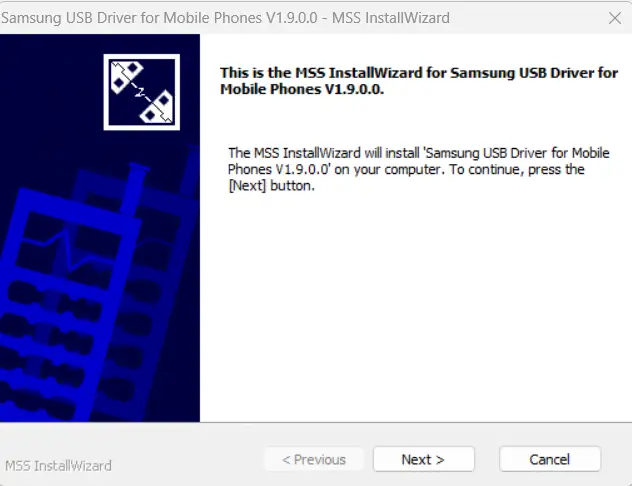
- Remove Old Drivers: (Important!) If you have any old Samsung drivers (like from Kies), go to “Add or Remove Programs” in Windows and uninstall them first.
- Download & Extract: Download the file from the button above. If it is in a
.zipfile, extract it using WinRAR or 7-Zip. - Run the Installer: Right-click on
Samsung_Android_USB_Driver_v1.9.0.0.exeand select “Run as administrator”. - Follow the Wizard: A setup wizard will appear. Click “Next”, “Install”, and “Finish” to complete the installation.
- Restart Your PC: Once the installation is complete, restart your computer. This is essential for the drivers to load correctly before you connect your phone.
After restarting, you can connect your Samsung device in any mode (MTP, ADB, or Download Mode), and your PC will now recognize it perfectly.